
Forex Hedge Scalper EA V27 Ready Now
Forex Hedge Scalper V27, featuring a more powerful and improved trading strategy, has officially been released.
Users who are currently running Hedge Scalper V26 can now upgrade to the new V27 version for free.
So, what has changed in V27, and what improvements can you expect from the new version?
What’s New in Forex Hedge Scalper V27?
1. More Powerful Trading Strategy
V27 comes with a more powerful trading strategy designed to provide greater stability and improved risk management across different market conditions.
The goal is to help keep your trading account safer and more stable while allowing the EA to take advantage of more profitable opportunities in the Forex market.
The updated strategy is designed to adapt better to changing market conditions, helping the EA identify and respond to trading opportunities more effectively.
2. Improved User Interface
The user interface has been redesigned to provide better visibility and a clearer overview of what is happening on your charts.
V27 displays more useful information directly on the chart, making it easier to monitor the EA and understand its current activity.
3. Faster License Validation
We have also improved the connection between the EA and our license server.
Some users reported that license validation could sometimes take longer than expected in V26.
With V27, the validation process has been optimized and is now much faster. In most cases, your license should be verified within approximately 1 minute.
4. No More Manual URL Setup
V27 also makes the setup process easier. You no longer need to manually add a URL to your MT4 or MT5 terminal for the EA to communicate with the server.
The new version uses a DLL connection. To use the EA, simply enable the Allow DLL imports option when attaching the EA to your chart.
How to Upgrade from V26 to V27
Worried about how to install the new EA? Don’t worry. The upgrade process is straightforward.
If you already have Hedge Scalper V26 running on your MT4 or MT5 account and want to upgrade to V27, please follow the steps below carefully.
Step 1: Do Not Close Your Running Trades
You do not need to close any of your running trades.
No matter how many trades are currently open on your account, do not interfere with them. Leave your existing trades running exactly as they are.
Step 2: Remove V26 from Your Charts
Close all charts where Hedge Scalper V26 is currently installed.
Make sure there are no charts left with V26 attached to them before installing the new version.
Step 3: Download and Install V27
Download the new Hedge Scalper V27 and copy the EA to your MT4 or MT5 terminal.
Follow this path:
MT4/MT5 → File → Open Data Folder → MQL4/MQL5 → Experts
Copy and paste the new EA into the Experts folder, then restart your MT4 or MT5 terminal.
Step 4: Open Your Trading Charts
After restarting your terminal, you should be able to see the new Hedge Scalper V27 in the Expert Advisors section.
Now open all the charts you want to trade with the EA.
Step 5: Generate a New Set File
Important: The previous V26 set file is not compatible with the new V27 version.
You must generate a new set file for V27.
Generate your new Hedge Scalper set file before continuing.
Step 6: Load V27 on Your Charts
Once you have generated your new set file:
- Load Hedge Scalper V27 onto your chart.
- Click Allow Algo Trading / Allow Auto Trading.
- Click Allow DLL imports.
- Load your newly generated V27 set file.
- Click OK.
- Repeat the same process for all charts where you want to run the EA.
After loading the EA, the license validation process may take approximately 1 minute.
Once your license has been successfully verified, your Hedge Scalper V27 setup is ready to go.
Backtesting Hedge Scalper V27
You may also want to backtest the new EA before running it on a live account.
If you receive an error such as “DLL not allowed” during backtesting, there is no need to worry.
You simply need to enable DLL imports in your MT4 or MT5 settings.
How to Enable DLL Imports
In your MT4 or MT5 terminal, go to:
Tools → Options → Expert Advisors → Allow DLL imports
Enable the Allow DLL imports option and then restart your MT4 or MT5 terminal.
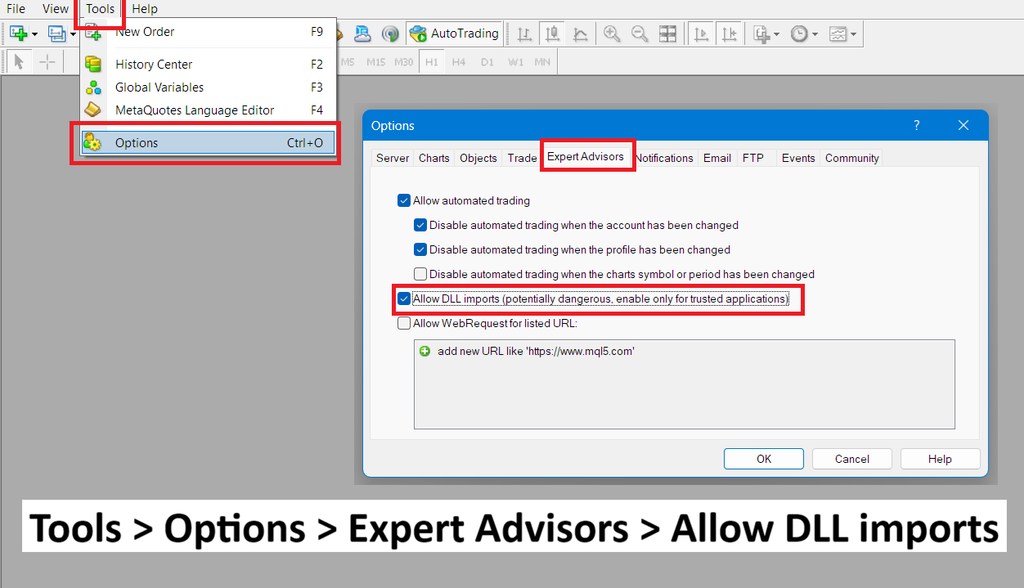
That’s all! You should now be able to backtest Hedge Scalper V27 successfully.
Ready to Upgrade to V27?
Forex Hedge Scalper V27 brings a more powerful strategy, an improved user interface, faster license validation, and a simpler connection setup with DLL support.
If you are currently using V26, you can upgrade to V27 for free. Just make sure you follow the upgrade steps above carefully and generate a new V27 set file before loading the EA onto your charts.
If you still have questions or need assistance, you can
contact us and ask your question.





Hello
I’ve up dated to V27 last week. It shows V27 on chart. But now I’m getting message to update to latest version on chart. I have restarted the Mt4
You need to download the EA again from website.