Forex Volatility Indicator for MT4 & MT5
Finding the most active currency pairs is one of the biggest challenges for Forex traders, especially scalpers and day traders. Trading a pair with low volatility can result in fewer opportunities, while highly volatile pairs often provide more frequent price movements and trading setups.
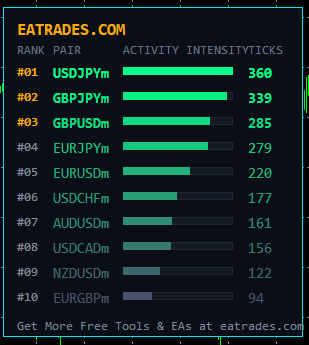
Instead of manually checking dozens of currency pairs one by one, you can use our Free Forex Volatility Scanner Indicator for MT4 and MT5. This powerful yet lightweight indicator displays the volatility of multiple currency pairs on a single chart and automatically ranks them from the highest volatility to the lowest.
The indicator refreshes twice every second, allowing you to monitor changing market conditions in real time and quickly identify the best trading opportunities.
Best of all, it is completely free to download and use, with no license fees, subscriptions, or expiration dates.
Free Download
📥 Download Volatility Scanner for MT4 (.ex4)
📥 Download Volatility Scanner for MT5 (.ex5)
What Is Forex Volatility?
Forex volatility refers to the amount of price movement in a currency pair over a specific period of time. A highly volatile pair experiences larger and more frequent price changes, while a low-volatility pair moves more slowly.
For example, if GBPJPY moves 80 pips in the last 30 minutes while EURCHF moves only 10 pips, GBPJPY is considered much more volatile during that period.
Understanding volatility helps traders choose the most active markets and adapt their trading strategies to current market conditions.
What Does the Forex Volatility Scanner Do?
The Forex Volatility Scanner monitors the recent price movement of all selected currency pairs and displays the results on one screen.
The indicator automatically sorts every pair from the highest volatility to the lowest, allowing you to instantly identify where the market is most active.
Instead of switching between multiple charts, you can monitor all your favorite pairs from a single dashboard.
This makes the indicator especially useful for:
- Scalpers
- Day traders
- Swing traders
- Breakout traders
- News traders
- Forex EA users
Key Features
- Completely free to use
- Supports both MT4 and MT5
- Displays multiple currency pairs on one chart
- Automatically ranks pairs by volatility
- Refreshes data twice every second
- Customizable lookback period
- Automatically detects broker prefixes and suffixes
- Fast and lightweight
- Beginner-friendly interface
- No license or activation required
How Does the Indicator Work?
The indicator continuously measures the price movement of every selected currency pair during your chosen time period.
It then compares the volatility values, sorts them from highest to lowest, and displays the results on your chart. The data is refreshed twice every second, helping you monitor live market activity with minimal delay.
This process allows traders to quickly identify the strongest market movements without manually checking individual charts.
Why Use a Volatility Scanner?
Using a Forex Volatility Scanner offers several advantages:
- Save time by scanning multiple pairs simultaneously.
- Find the most active markets instantly.
- Improve scalping opportunities.
- Avoid trading during low-volatility periods.
- Compare market activity using different lookback periods.
- Monitor all major Forex pairs from one chart.
- Make better-informed trading decisions.
Installation Guide
Installing the indicator is quick and simple.
- Download the MT4 or MT5 version.
- Open your MetaTrader platform.
- Click File → Open Data Folder.
- Open the MQL4 → Indicators folder (or MQL5 → Indicators for MT5).
- Copy the Volatility Scanner file into the Indicators folder.
- Restart MetaTrader.
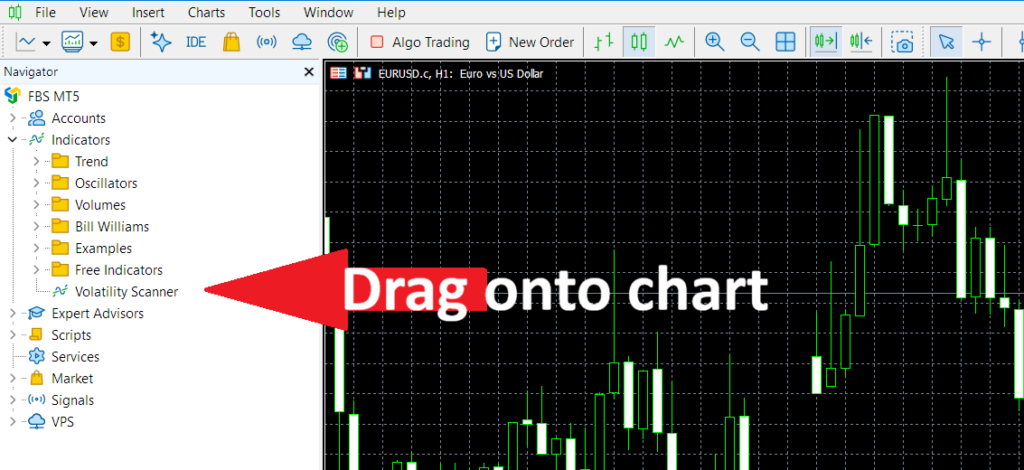
- Drag the indicator onto any chart.
The indicator is now ready to use.
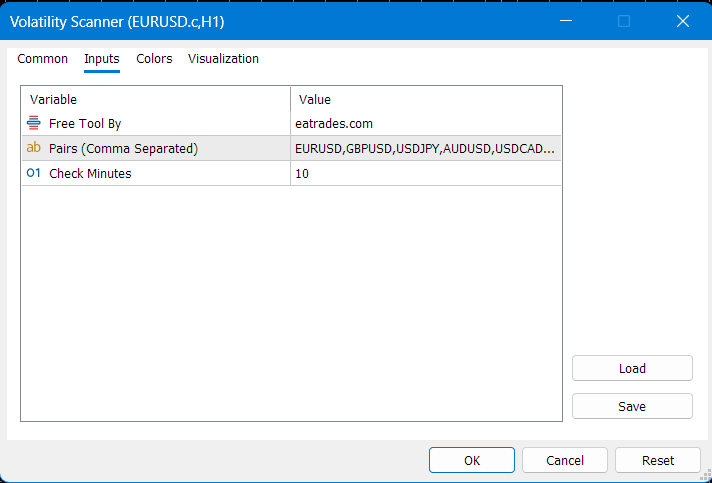
Input Parameters
Currency Pairs
Enter the currency pairs you want to monitor, separated by commas.
Example:
EURUSD,GBPUSD,USDJPY,AUDUSD,USDCAD
The indicator automatically detects your broker’s symbol prefixes and suffixes, so you do not need to enter them manually.
Check Minutes
This setting determines how many previous minutes are used to calculate volatility.
For example:
- 5 minutes – ideal for scalping
- 15–30 minutes – suitable for day trading
- 60 minutes or more – useful for swing trading
The default value is 10 minutes.
Who Should Use This Indicator?
This indicator is suitable for:
- Forex scalpers
- Intraday traders
- Swing traders
- News traders
- Algorithmic traders
- Beginners learning market activity
- Professional traders looking for faster market analysis
License
The Forex Volatility Scanner is developed and distributed free of charge by EA Trades.
There are:
- No activation keys
- No license fees
- No subscriptions
- No expiration date
- No usage limits
You are free to download, install, and use the indicator on your MetaTrader platform.
Frequently Asked Questions
Is this indicator free?
Yes. It is completely free with no hidden costs or subscriptions.
Does it work on MT4 and MT5?
Yes. Separate versions are available for both MetaTrader 4 and MetaTrader 5.
Does it repaint?
No. The indicator simply measures recent price movement and updates the displayed values in real time.
Does it support broker suffixes and prefixes?
Yes. The indicator automatically detects broker-specific symbol names.
Can I change the lookback period?
Yes. You can specify any number of minutes to compare recent volatility.
Is it suitable for beginners?
Absolutely. The interface is simple and requires no advanced configuration.