
Automatic Forex TP and SL EA for MT4 and MT5 – Free Download
Managing Stop Loss and Take Profit levels manually can become time-consuming, especially when you have multiple Forex trades open at the same time. Auto Forex TP and SL Adjustment EA is a free MetaTrader Expert Advisor designed to automatically set and adjust TP and SL levels on your open trades.
The EA is available for both MT4 and MT5 and is being offered completely free to everyone.
It is a trade-management tool rather than a trading strategy. It does not generate trading signals or open new trades. Instead, it works with your existing positions and automatically applies the TP and SL settings you choose.
What Is the Auto Forex TP and SL Adjustment EA?
The Auto Forex TP and SL Adjustment EA is designed for traders who want to automate the process of setting Stop Loss and Take Profit levels.
After attaching the EA to your MetaTrader chart, it continuously checks eligible open trades. Based on your settings, it can automatically calculate and apply the appropriate TP and SL levels.
Automatic Stop Loss
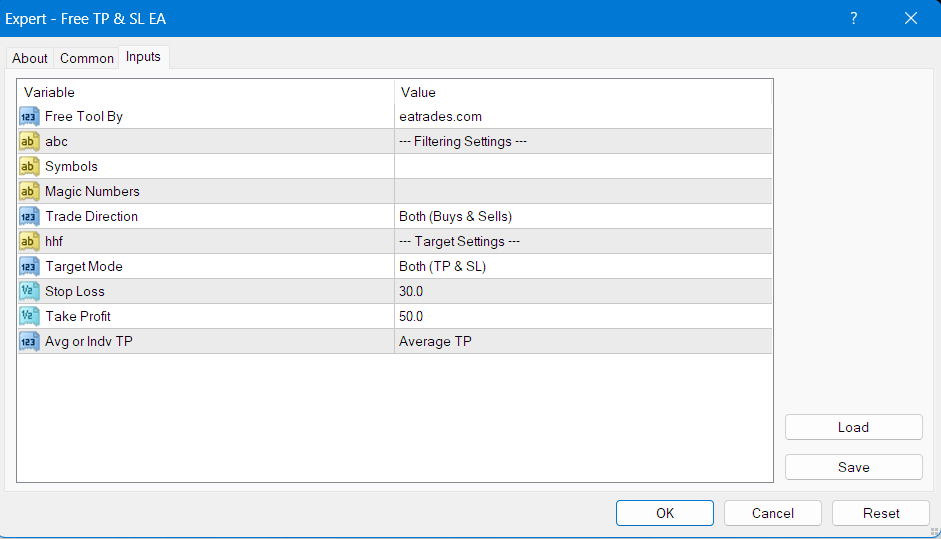
The EA allows you to define your preferred Stop Loss distance in pips.
For example, if you set:
Stop Loss = 30 pips
the EA automatically calculates the appropriate Stop Loss level based on the opening price of each eligible trade.
For Buy trades, the Stop Loss is placed below the entry price, while for Sell trades it is placed above the entry price.
Automatic Take Profit
You can also specify your desired Take Profit distance.
For example:
Take Profit = 50 pips
The EA automatically calculates the TP level according to the trade direction and your selected settings.
You can choose to use:
- Both TP and SL
- TP only
- SL only
This gives you flexibility depending on your trading strategy.
Average Take Profit for Multiple Orders
One of the key features of the Auto Forex TP and SL Adjustment EA is its ability to use an average entry price for multiple trades.
When several eligible Buy or Sell positions are open, the EA can calculate a lot-weighted average entry price and use that price as the basis for the Take Profit calculation.
This can be useful for traders who use:
- Multiple entries
- Averaging strategies
- Grid-style trading
- Position-building strategies
Instead of calculating the TP separately from every individual entry, the EA can calculate the target from the group’s average entry price.
Symbol Filtering
The EA allows you to specify which symbols it should manage.
For example:
EURUSD, GBPUSD, USDJPY
You can enter multiple symbols separated by commas.
If you leave the symbol field empty, the EA can manage trades across all symbols.
Magic Number Filtering
You can also control trades using Magic Numbers.
For example:
1000, 2000, 3000
This allows you to tell the EA which Expert Advisor trades it should manage.
This can be useful when you have multiple trading systems running on the same MetaTrader account and only want the Auto Forex TP and SL Adjustment EA to manage specific trades.
Buy and Sell Trade Filtering
The EA provides three direction options:
- Both – manage Buy and Sell trades
- Buy Only – manage Buy trades only
- Sell Only – manage Sell trades only
This gives you additional control over which positions receive automatic TP and SL adjustments.
Modern Account Dashboard
The Auto Forex TP and SL Adjustment EA also includes a modern dark-themed dashboard directly on the MetaTrader chart.
The dashboard displays important account and trading information, including:
- Floating P/L
- Account Balance
- Account Equity
- Drawdown
- Profit Today
- Open Trades
- Buy/Sell trade count
- Active Volume
- Margin Level
The information is continuously updated while the EA is running.
Designed for Existing Trades
It is important to understand that the Auto Forex TP and SL Adjustment EA is not a Forex signal generator or automatic trading strategy.
It does not:
- Open new trades
- Search for Buy or Sell signals
- Predict market direction
- Guarantee profits
Its purpose is to manage the TP and SL settings of eligible existing trades.
This makes it useful as a separate trade management tool alongside your own manual trading or other Expert Advisors.
Free for Everyone
The Auto Forex TP and SL Adjustment EA is completely free for everyone.
You do not need to purchase a license or pay a subscription to use it.
Free features include:
- Automatic Stop Loss adjustment
- Automatic Take Profit adjustment
- Average TP for multiple orders
- Symbol filtering
- Magic Number filtering
- Buy/Sell filtering
- MT4 version
- MT5 version
- Trading dashboard
How to Install
MT4: Copy the EA file to MQL4 → Experts, restart MT4, and attach it to a chart; MT5: copy the EA file to MQL5 → Experts, restart MT5, and attach it to a chart.
Download Auto Forex TP and SL Adjustment EA for Free
If you are looking for a free Forex TP and SL EA for MT4 and MT5, the Auto Forex TP and SL Adjustment EA provides an easy way to automate the management of Stop Loss and Take Profit levels on your existing trades.
With automatic TP and SL adjustment, average TP functionality, symbol and Magic Number filtering, Buy/Sell controls, and a built-in trading dashboard, it can be a useful addition to your MetaTrader trading setup.
Download the free MT4 or MT5 version and start managing your Forex trades automatically.
this EA helps a lot. you can use the mt5 file and no problem. BUT the mt4 file is not working. the mt4 platform says. ‘Equity and Balance Tracker’ is not expert and cannot be executed.. All of your Free MT4 ex4 file indicator and EA have a problem. but thank you. the mt5 file is working. thx
Brother, its clearly written that this is a indicator, if you use it in expert, how can it work? for the indicators, you need to copy them to indicators folder and for the experts, you need to copy them to experts folder, only then it can work. balance and equity tracker is a indicator, and you are using it as a EA. That’s why its not working