News Event Guard for MT4 & MT5
Protect your automated Forex trading setup from selected economic news events. News Event Guard monitors news impact levels and automatically switches off terminal-level AutoTrading or Algo Trading when a restricted event is detected. It restores automated trading when the restriction period ends.
What Is News Event Guard?
Economic news announcements can create sudden market movements, increased volatility, and unpredictable price changes. These conditions can be challenging for automated Forex trading systems, particularly when several Expert Advisors are running at the same time.
News Event Guard is a utility available for MetaTrader 4 and MetaTrader 5. It monitors economic news events and automatically controls the platform’s automated trading function according to the news impact setting you select.
Instead of manually switching automated trading off before important announcements and turning it back on afterward, the utility handles this process automatically.
Main Features
News Event Guard is designed to provide straightforward news protection for traders who use automated strategies on MT4 or MT5.
Understanding News Impact Levels
Economic calendars commonly classify news announcements according to their expected market impact. News Event Guard uses three impact categories to let you decide which events should restrict automated trading.
High Impact News
Red
Important economic announcements that may cause significant
market volatility and sharp price movements.
Medium Impact News
Orange
Economic announcements that may create noticeable market
movements depending on the currency and market conditions.
Low Impact News
Yellow
Announcements generally associated with lower expected
market impact.
News Event Guard Settings
The utility provides three news filtering options. You can choose the level of protection that suits your automated trading approach.
This setting restricts automated trading during high, medium, and low impact news events. Choose this option if you want to avoid all news categories monitored by the utility.
With this option, the utility restricts automated trading during medium and high impact news events while allowing trading during low impact news events.
This is the default setting. Automated trading is restricted only when high impact news events are detected. Medium and low impact news events do not trigger the restriction.
How Does News Event Guard Work?
Once installed and configured, News Event Guard monitors the relevant economic news events. When a restricted event is detected, it uses a DLL to switch off the terminal’s automated trading function.
- Monitor news events: The utility checks the news events affecting the monitored currency pairs.
- Check your filter setting: It determines whether the detected event matches your selected impact category.
- Disable automated trading: If the event matches your filter, the utility switches off terminal-level AutoTrading or Algo Trading.
- Restore automated trading: When the news restriction ends, the utility automatically restores the automated trading function.
This process helps automate the task of pausing and resuming Expert Advisor activity around selected economic announcements.
Watch How to Use News Event Guard
Prefer watching a video instead of reading instructions? Watch this tutorial to learn how to use News Event Guard and understand its settings.
News Event Guard for MetaTrader 4
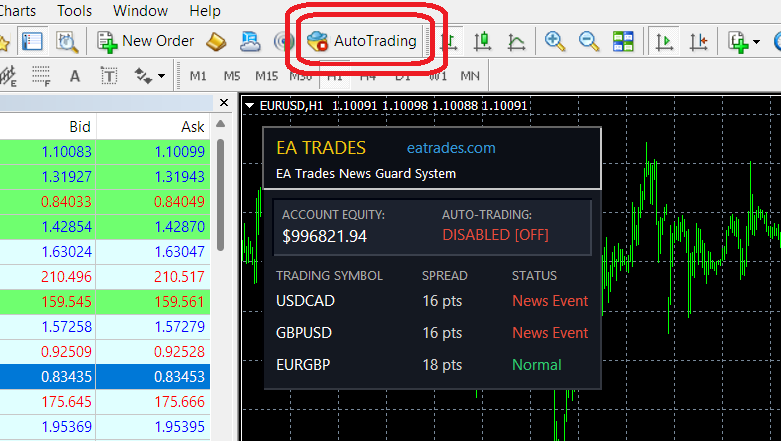
The MT4 screenshot below shows News Event Guard detecting news events affecting USD/CAD and GBP/USD. The utility has switched off the terminal’s AutoTrading function while the restricted news events are active.
News Event Guard for MetaTrader 5
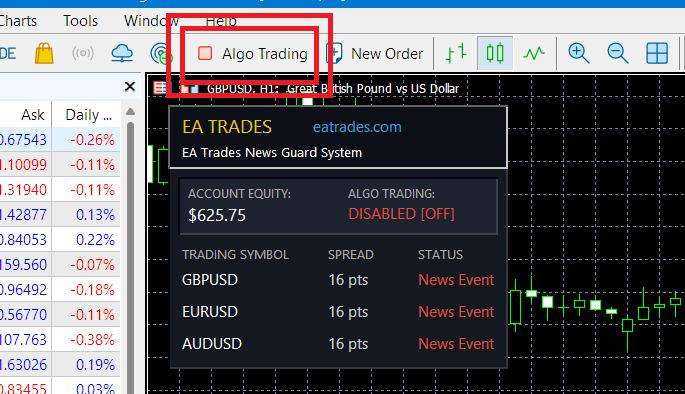
The MT5 example shows the utility detecting news events affecting GBP/USD, EUR/USD, and AUD/USD. Algo Trading is switched off at the terminal level while the relevant restriction is active.
Monitoring Multiple Currency Pairs
News Event Guard can monitor news events affecting several currency pairs simultaneously. This is useful for traders who operate multiple Expert Advisors across different Forex symbols.
For example, imagine you have automated strategies running on USD/CAD, GBP/USD, and EUR/GBP. If news events affecting USD/CAD and GBP/USD match your selected filter, News Event Guard can switch off terminal-level automated trading.
The restriction is applied at the platform level. It is not limited to only the currency pair affected by the news. Therefore, other Expert Advisors running on the same terminal are also affected.
Important: Enable DLL Imports
News Event Guard uses a DLL to control the MetaTrader AutoTrading or Algo Trading function. For this reason, you must allow DLL imports in the Expert Advisor settings.
How to Enable DLL Imports
- Attach News Event Guard to your MetaTrader chart.
- Open the Expert Advisor properties or settings window.
- Find the option labelled Allow DLL imports.
- Enable the DLL permission.
- Confirm the settings and check that the EA is running without errors.
Make sure you understand and trust the software before allowing DLL imports. Use the utility only from a source you trust.
Download News Event Guard
Choose the version that matches your MetaTrader platform. Install the utility, configure your preferred news impact setting, and make sure DLL imports are allowed.
Select the correct version for your trading platform.